
WireGuard VPN Gateway on Raspberry Pi
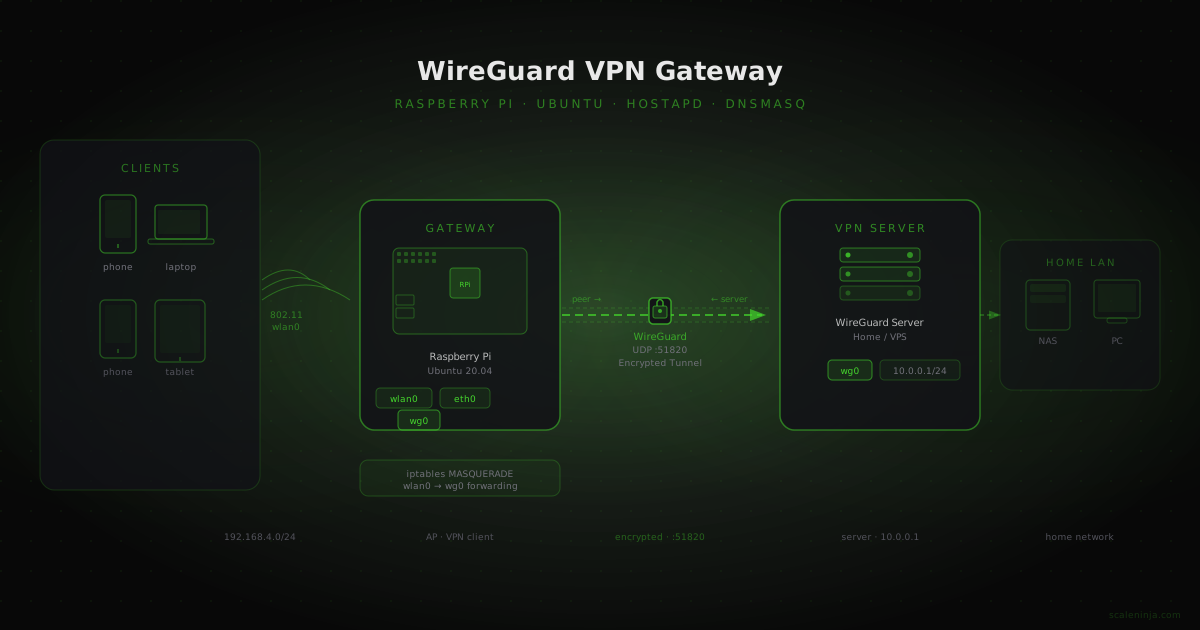
Turn a Raspberry Pi into a WireGuard VPN-backed WiFi access point using hostapd and dnsmasq on Ubuntu 20.04 — all traffic from connected devices tunnels through WireGuard automatically.
My parents needed access to our home network remotely. Rather than exposing services directly, I set up a Raspberry Pi as a WiFi access point — devices connect to the AP, and all traffic is tunnelled through WireGuard back to the home server. Simple, encrypted, no client configuration needed on their phones or laptops.
Install dependencies
apt-get update
apt-get install wireguard wireguard-tools dnsmasq hostapd resolvconf
WireGuard VPN Setup
This guide assumes you already have a WireGuard server running. If not, DigitalOcean’s guide covers the server side well.
On the Raspberry Pi (the VPN client), create the interface config:
cat /etc/wireguard/wg0.conf[Interface]
PrivateKey = <your client's private key>
Address = <wg client ip>/24
DNS = 8.8.8.8, 8.8.4.4
[Peer]
PublicKey = <wg server public key>
PresharedKey = <wg server psk>
Endpoint = <wg server IP or domain>:51820
AllowedIPs = 0.0.0.0/0, ::0/0
PersistentKeepalive = 15Enable and start the tunnel:
systemctl enable --now wg-quick@wg0Verify the interface is up and the peer has connected:
wginterface: wg0
public key: <hidden>
private key: (hidden)
listening port: <hidden>
fwmark: 0xca6c
peer: <hidden>
preshared key: (hidden)
endpoint: <wg server IP>:51820
allowed ips: 0.0.0.0/0, ::/0
latest handshake: 1 minute, 36 seconds ago
transfer: 1.52 MiB received, 501.10 KiB sent
persistent keepalive: every 15 secondswg0 interface is up.
Configure the Wireless Access Point
I’m using 192.168.4.1/24 for the AP network. Assign the static IP to wlan0 via netplan:
cat /etc/netplan/01-netplan.yamlnetwork:
version: 2
renderer: networkd
ethernets:
eth0:
dhcp4: no
addresses: [192.168.1.5/24]
gateway4: 192.168.1.1
nameservers:
addresses: [8.8.8.8, 8.8.4.4]
wifis:
wlan0:
dhcp4: false
addresses:
- 192.168.4.1/24Apply:
netplan generate
netplan apply
hostapd
cat /etc/default/hostapdDAEMON_CONF="/etc/hostapd/hostapd.conf"cat /etc/hostapd/hostapd.confinterface=wlan0
driver=nl80211
ssid=<Wifi Name Here>
hw_mode=g
channel=6
ieee80211n=1
wmm_enabled=1
ht_capab=[HT40][SHORT-GI-20][DSSS_CCK-40]
country_code=IN
macaddr_acl=0
auth_algs=1
ignore_broadcast_ssid=0
wpa=2
wpa_key_mgmt=WPA-PSK
wpa_passphrase=<password here>
wpa_pairwise=TKIP
rsn_pairwise=CCMPEnable the service:
systemctl unmask hostapd
systemctl enable --now hostapd
dnsmasq
dnsmasq handles DHCP for clients connecting to the AP:
cat /etc/dnsmasq.confinterface=wlan0
listen-address=192.168.4.1
dhcp-range=192.168.4.2,192.168.4.50,255.255.255.0,24h
bind-dynamic
domain-needed
bogus-privDisable systemd-resolved (it conflicts with dnsmasq on port 53) and set a static resolver:
cat /etc/resolv.confnameserver 8.8.8.8
nameserver 8.8.4.4systemctl stop systemd-resolved
systemctl mask systemd-resolved
systemctl restart dnsmasqsystemd-resolved is a system-wide change. Make sure your /etc/resolv.conf is a plain file (not a symlink) pointing at real nameservers before restarting.
Route AP Traffic Through WireGuard
Enable kernel IP forwarding:
# Uncomment in /etc/sysctl.conf:
net.ipv4.ip_forward=1
Apply without rebooting:
sysctl -p
# net.ipv4.ip_forward = 1
Add NAT rules so wlan0 traffic is masqueraded out through wg0, and persist them:
iptables -t nat -A POSTROUTING -o wg0 -j MASQUERADE
iptables -A FORWARD -i wlan0 -o wg0 -j ACCEPT
iptables -A FORWARD -i wg0 -o wlan0 -m state --state RELATED,ESTABLISHED -j ACCEPT
apt-get install iptables-persistent
reboot192.168.4.0/24) get their traffic forwarded from wlan0 to wg0. The WireGuard interface encrypts everything and sends it to the server. From the server, traffic reaches the home network as if the Pi itself originated it.
After reboot, any device connected to the AP will have its traffic automatically encrypted and tunnelled through WireGuard — no VPN app needed on the client.